



Short Answer: Use SalesIQ, Not CRM
Yes, you can put an AI bot on WhatsApp inside Zoho — but it has to live in Zoho SalesIQ, not Zoho CRM. Connect a Meta WhatsApp Business number to SalesIQ, put a Zia Agent or a Zobot on that channel, and keep Zoho CRM as the system of record so every conversation lands on a Lead or Contact.
The mistake we see most often: a team turns on CRM Business Messaging and calls it a chatbot. That feature lets a salesperson send WhatsApp messages from a record — it has no Zobot, no Zia Agent, and no knowledge-base bot behind it. If the brief is "AI WhatsApp bot," SalesIQ is not optional.
How the Stack Fits Together
One WhatsApp number, four layers, each with a distinct job:
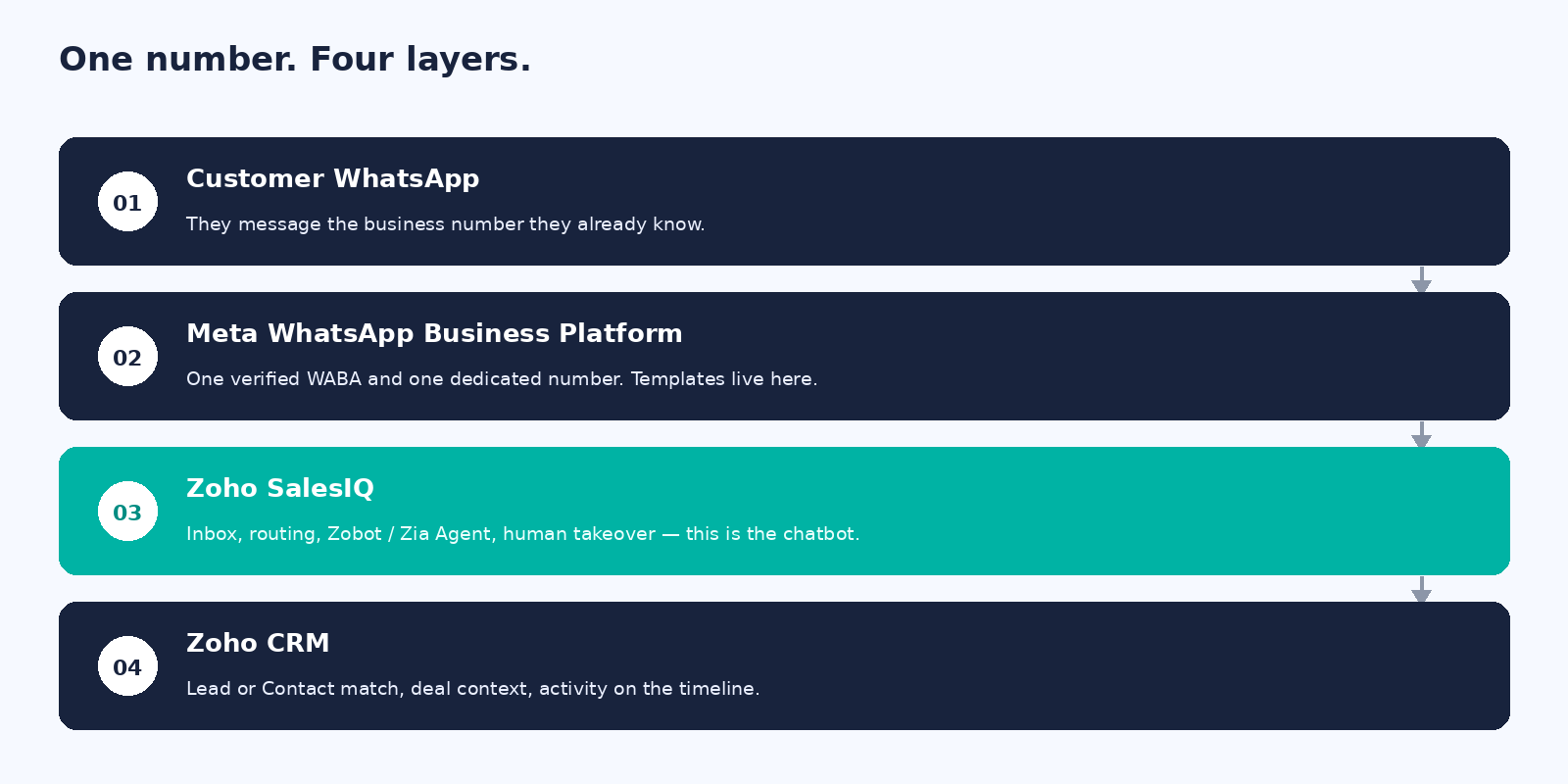
- Customer WhatsApp — they write to the business number they already know.
- Meta WhatsApp Business Platform — one verified WABA and one dedicated number; message templates live here.
- Zoho SalesIQ — the inbox, routing, Zobot / Zia Agent and human takeover. This is the chatbot layer.
- Zoho CRM — Lead or Contact match, deal context, and activity on the timeline.
Set up SalesIQ first: Settings → Messaging Channels → WhatsApp, connect the WABA, verify the number, and let inbound chats land in one inbox alongside website live chat. Then add the AI layer, and finally link SalesIQ back to CRM so every match writes to a record.
CRM Business Messaging vs. SalesIQ WhatsApp
Both features can send a WhatsApp message from Zoho. Only one of them is a chatbot.
| Question | CRM Business Messaging | SalesIQ channel |
|---|---|---|
| Where the team works | On the Lead or Contact record | Unified inbox: website chat + WhatsApp |
| AI chatbot | No Zobot, Zia Agent, or connected LLM | Zobot, Zia Agent, or a connected LLM |
| Routing and queues | Mostly the record owner | Departments, rules, last agent, CRM owner |
| Writes back to CRM | Native on the timeline | Yes, once SalesIQ is linked to CRM |
| Best for | Reps messaging people they already know | Inbound WhatsApp plus a bot that can hand over |
Since Summer '26, the same WhatsApp number can sit on more than one Zoho product, so this isn't strictly either/or. Connect SalesIQ first if the goal is a bot; add CRM Business Messaging afterward, on the same number, if reps also want to message from the record.
Choosing the AI: Zia Agent, Zobot, or a Connected LLM
Pick one primary brain. A Zia Agent that looks up CRM, a Zobot that asks five qualifying questions, and a raw ChatGPT card all fighting over the same inbound message is a support incident waiting to happen.
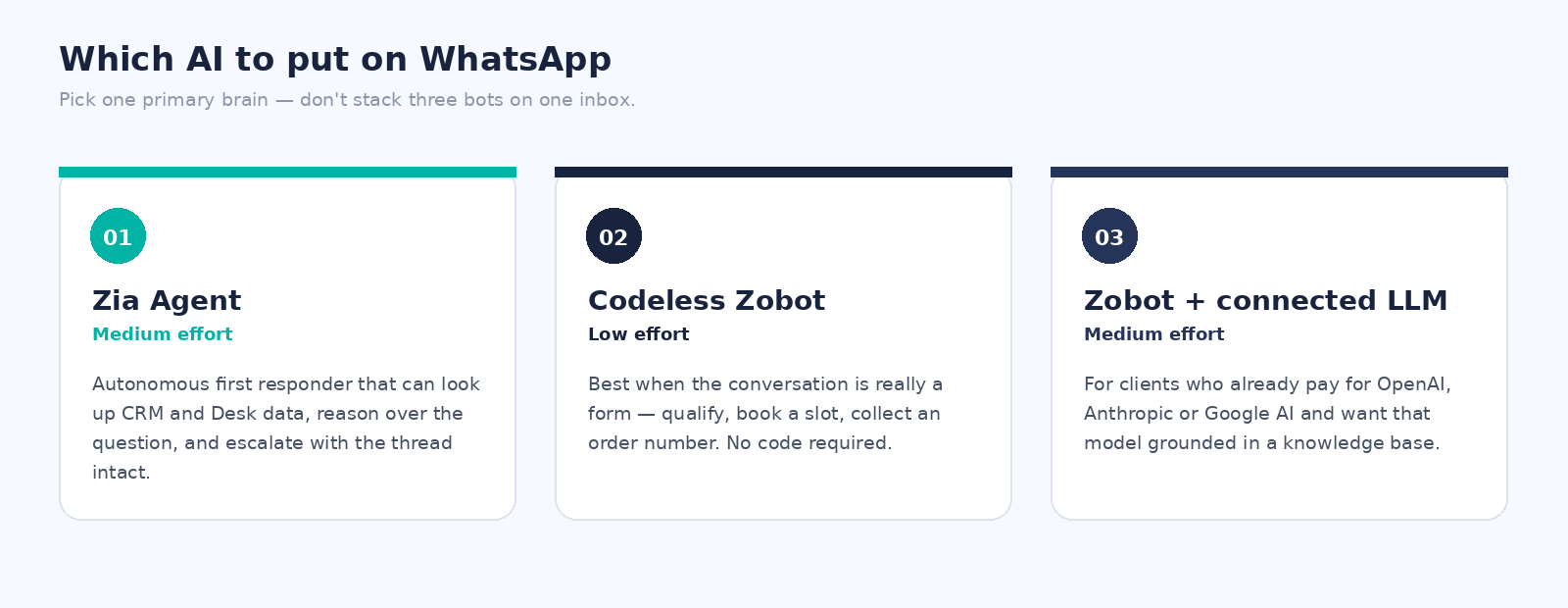
- Zia Agent (default for most Zoho CRM clients) — an autonomous first responder that can reason over the question, pull CRM or Desk context, and escalate with the thread intact. Deploy it from Zoho Agent Studio into SalesIQ; it needs a written job description and an explicit transfer-to-human rule.
- Codeless Zobot — best when the conversation is really a form: book a slot, capture a source, ask a qualifying question. No code required, and it can fire approved WhatsApp templates mid-flow with the Channel Message card.
- Zobot + a connected LLM (OpenAI, Anthropic, Google AI, or DeepSeek via BYOAI) — for clients who already pay for a model or have a prompt library they want reused. Always define a failure handler and ground replies in a knowledge base, or the bot will drift off-policy.
Whichever you pick, the bot should do five things on day one: greet in the client's language and say what it can help with; capture a name and a reachable mobile or email when CRM has no match; answer from the knowledge base or say it doesn't know; offer "talk to a person" on every stuck turn; and write or update the Lead or Contact so the chat is logged on the record.
The Enablement Runbook
Work top to bottom. Meta verification and template approval are the usual stall points — start them early and polish the bot copy in parallel.
- Prerequisites. Get a Meta Business Manager admin, the WABA ID, and a dedicated number from the client that can receive an OTP. Start Meta business verification if it isn't live — unverified businesses get throttled and template approvals stall. Agree the opt-in rule before anyone sends a template: capture it on web forms, checkout, or a keyword reply such as START, and never import a cold list.
- SalesIQ. Stand up the portal with at least one department and the human operators who will take over from the bot. Connect the WhatsApp channel (Settings → Messaging Channels → WhatsApp → Add), verify the number by OTP, and submit at least a Utility welcome template and a handover or confirmation template before any Marketing template.
- CRM link. Connect SalesIQ to Zoho CRM and map visitor name, email and phone to Lead or Contact fields. Turn on the CRM widget in the operator chat window. Route unknown numbers to the bot and then a department queue; route known CRM contacts to the record owner.
- AI bot. Pick the shape from the section above, ground it in the client's real answers — hours, pricing, policies, what it must never say — and deploy it to the WhatsApp channel with a written transfer-to-human protocol.
- Optional CRM inbox. Only if reps will also message from the record — see below.
- Go-live. Run the test pack before calling it done — see the checklist below.
Optional: CRM Business Messaging
Enable this only if salespeople need to send WhatsApp from a Lead or Contact record — it is not a substitute for the chatbot above. It's native on Enterprise, Ultimate, or Zoho One, and since Summer '26 it can share the same number as the SalesIQ channel, so a second number isn't needed. Skip it on day one if the team will work entirely from the SalesIQ inbox.
Go-Live Test Checklist
Run these six tests on a staff phone that isn't the business number before handing the inbox to the client:
- An unknown number messages in → the bot responds → a Lead is created.
- An existing CRM mobile number messages in → the record is matched.
- A question the knowledge base covers gets a correct, sourced answer.
- A question the bot can't answer escalates to a human.
- An approved template reopens the conversation after the 24-hour window.
- The full conversation is visible on the CRM record.
Watch Meta's conversation charges while you test — they're billed per conversation, not per Zoho seat.
Common Pitfalls to Avoid
- The phone app is a dead end. The regular WhatsApp Business app has no public API. Once a number is connected through the WhatsApp Business Platform, it leaves the phone app.
- Migrating off Wati, Twilio, or Interakt? Disable two-factor on the current provider, keep the WhatsApp display name identical, then add the channel in SalesIQ and verify by OTP. Warn the client about a short cutover window.
- Templates vs. free-form replies. Inside a 24-hour customer-care window you can reply freely; outside it, only an approved template can reopen the conversation.
- Lead creation and workflows. A record created straight from a Zobot doesn't always fire CRM workflow rules — if automation must run, create the Lead through a connection or invokeurl so it behaves like a normal API write.
- AI without a handover is a support incident. Every Zia Agent needs an explicit transfer-to-human instruction, and WhatsApp users need a visible "talk to a person" path.
- Data leaving Zoho. Zia stays inside the Zoho stack; OpenAI, Anthropic, Google AI and DeepSeek send chat text to that provider. Confirm data residency and keep sensitive fields out of the prompt.